
Ithaca College CMS Redesign
A CMS redesign for Ithaca College's content editors.
Project Background
For five years, Ithaca College's (IC) Drupal CMS had been quietly stealing time from the very people trying to help the university shine.
Dozens of faculty and staff logged in each week to update events, programs, and announcements. But instead of feeling empowered, they felt lost. The Save button buried after miles of scrolling. Adding a new section to a page meant guessing from a dropdown full of cryptic twins: "CTA Intro Hero" vs. "Featured Hero Card." No descriptions. No previews.
Therefore the goal was to make editing faster, clearer, and more pleasant without breaking any published content.
Role
Solo/Lead
UX Designer
UX Designer
Team
1 UX Designer,
2 Developers, 1 PM
2 Developers, 1 PM
Timeline
5 Months
(December – April)
(December – April)
Impact
65%
reduction in component selection errors
+28%
increase in returning
weekly editors
52%
decrease in
abandoned edits
How we got there: The Problem
Editors couldn't identify components, couldn't easily save their work, and couldn't add content where they needed it. So many simply stopped trying.
The Quiet Crisis in 238 Tickets
Mixed-methods Approach
I started where the pain had already been documented: the support ticket system. Twelve months. 238 tickets.
The numbers were whispering a clear story:
- 12% of all tickets were just asking where is the Save button?
- 25% were "which dropdown option does X?" Especially between nearly identical components.
- 0% of editors could insert content above an existing block. Only append. Then drag. YIKES.
Then I sat down with six editors. No scripts. Just watching them work.
The dropdown problem wasn't laziness, it was legibility. Two different components had nearly identical names but behaved differently. One editor had accidentally rebuilt the same callout box three times because she couldn't tell them apart.
The save button wasn't laziness either, it was invisible affordance. One editor had lost 20 minutes of work when she hit "back" instead of "save" (which was off screen).
And the append-only architecture? That was pure learned helplessness. Editors had built workarounds like duplicating whole pages just to add a new paragraph at the top.
The dropdown problem wasn't laziness, it was legibility. Two different components had nearly identical names but behaved differently. One editor had accidentally rebuilt the same callout box three times because she couldn't tell them apart.
The save button wasn't laziness either, it was invisible affordance. One editor had lost 20 minutes of work when she hit "back" instead of "save" (which was off screen).
And the append-only architecture? That was pure learned helplessness. Editors had built workarounds like duplicating whole pages just to add a new paragraph at the top.
Connecting Research To Redesign
Decision 1: Kill The Dropdown. Build a Gallery
The data was undeniable: 1 in 4 support tickets was about not knowing which component to pick. When I watched editors work, I saw why. The dropdown was asking them to make a decision without giving them the information they needed.
So I asked myself: What would actually help someone choose?
So I asked myself: What would actually help someone choose?
The answer came in four parts:
- Show them what it looks like → Add image previews
- Tell them what it does → Clear one sentence descriptions
- Organize by goal, not alphabet → Create buckets based on real usage patterns
- Name it for meaning → Rename everything from "Card Featured" to "Spotlight Slider"
I spent a full week auditing all 40+ components. I merged duplicates. I killed components that did the same thing. I renamed 15 of them. Then I sorted them into six buckets: Most Used, Text & Content, Media, Cards & Tiles, Lists & Collections, and Special Use.
The dropdown became a gallery. The guesswork became recognition.
The dropdown became a gallery. The guesswork became recognition.
Decision 2: Make Save Impossible to Miss.
12% of tickets were just asking where Save was. That's not a user problem. That's a design problem.
I realized the page layout was treating Save like just another field at the bottom of a form. But on a page that could be 10 screens tall, the bottom might as well have been another zip code.
The fix was simple: detach Save from the scroll. Pin it to the top. Always visible. Always one click away.
I realized the page layout was treating Save like just another field at the bottom of a form. But on a page that could be 10 screens tall, the bottom might as well have been another zip code.
The fix was simple: detach Save from the scroll. Pin it to the top. Always visible. Always one click away.
Decision 3: Let Editors Add Content Anywhere
Zero editors could insert above an existing component. Zero. That meant every single person using the CMS had accepted a broken workflow as normal.
The technical limitation was legacy code. But the user need was simple: I want to put this new section right here, not at the bottom.
I worked with the developers to add visual reorder handles and an "add here" button between every existing component. No more append and pray. Just drag, drop, or click.
The technical limitation was legacy code. But the user need was simple: I want to put this new section right here, not at the bottom.
I worked with the developers to add visual reorder handles and an "add here" button between every existing component. No more append and pray. Just drag, drop, or click.
What We Built: Three Before & After Moments
Finding Your Content (Overall UI)
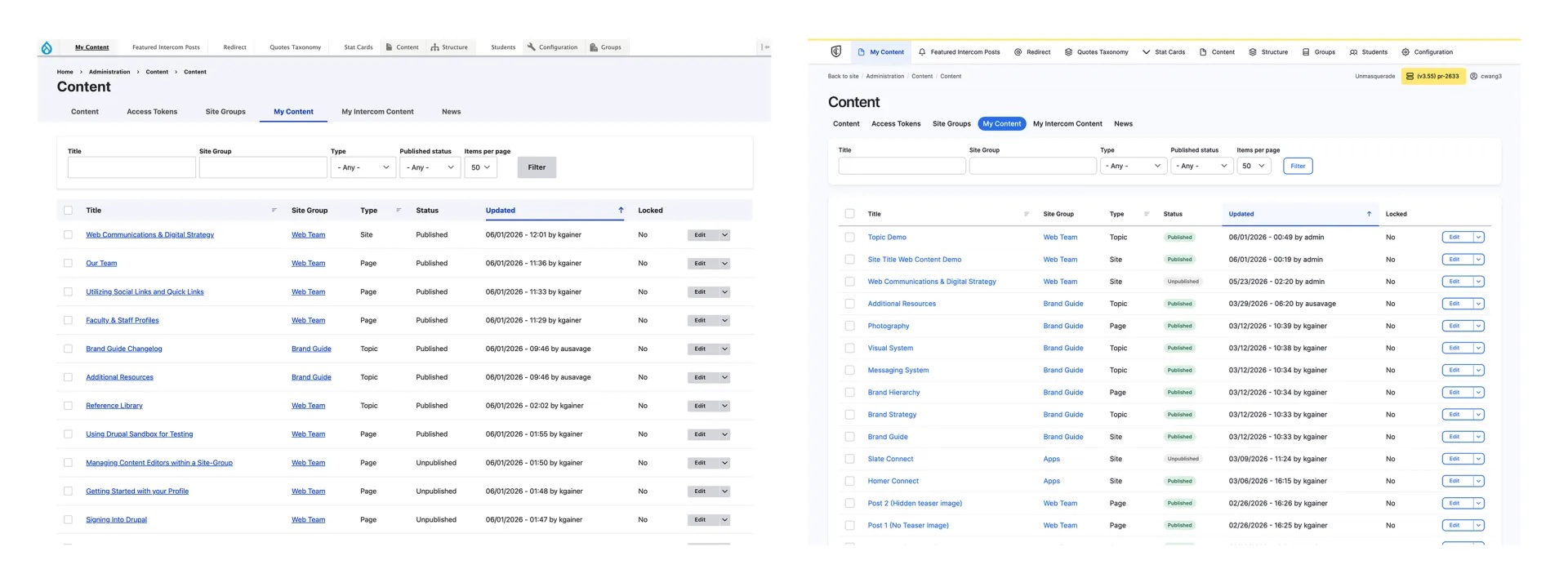
Before: The content list screen was a wall of gray text. Every row looked the same. Titles, authors, and statuses blurred together because nothing had visual weight.
After: Cleaner typography, subtle spacing, and a light hierarchy. Same columns and filters, just organized for the human eye. Scanning for a specific page now takes seconds instead of a double take.
After: Cleaner typography, subtle spacing, and a light hierarchy. Same columns and filters, just organized for the human eye. Scanning for a specific page now takes seconds instead of a double take.
Editing a Page (The Save Button That Follows You)
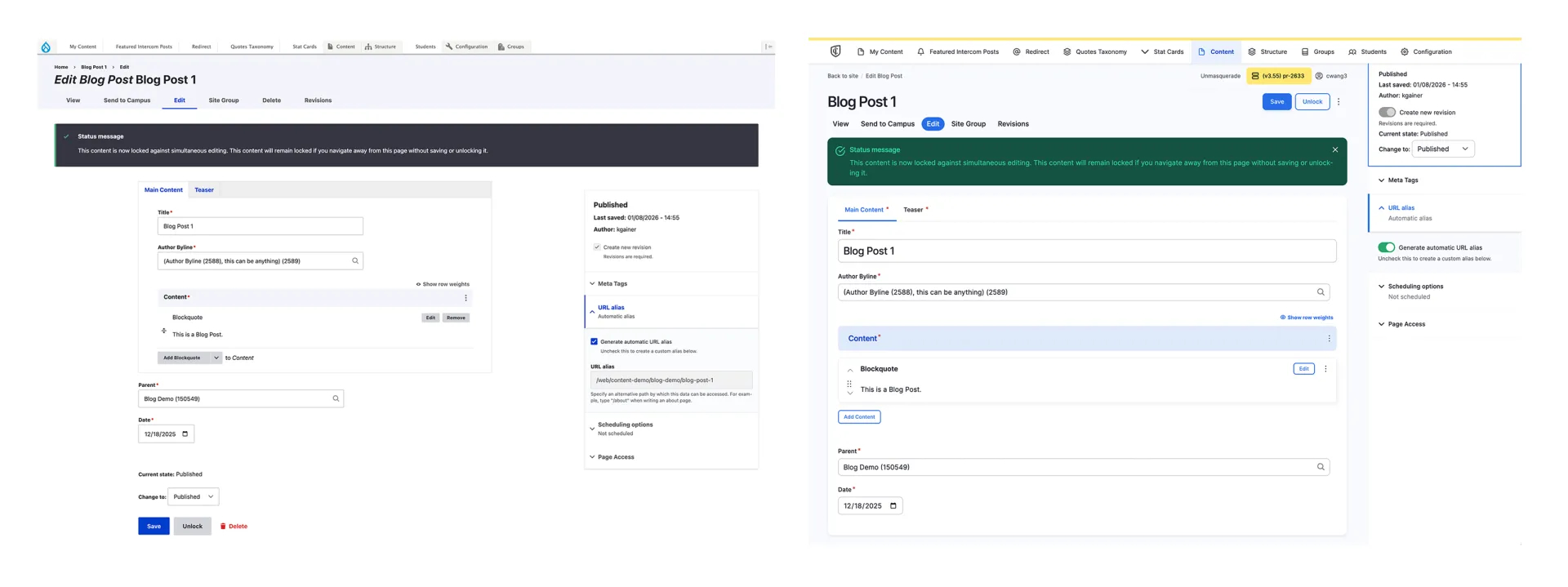
Before: The edit page was an infinite scroll. You'd make a small change, then scroll past all the content just to find the Save button at the very bottom. Adding new content? You could only append to the end, then drag it up, assuming you didn't lose your place or accidentally hit "back."
After: A clean, persistent bar locks to the top of the screen the moment you start scrolling. Components can be reordered, edited in place, and added above an existing one.
After: A clean, persistent bar locks to the top of the screen the moment you start scrolling. Components can be reordered, edited in place, and added above an existing one.
Adding a Component
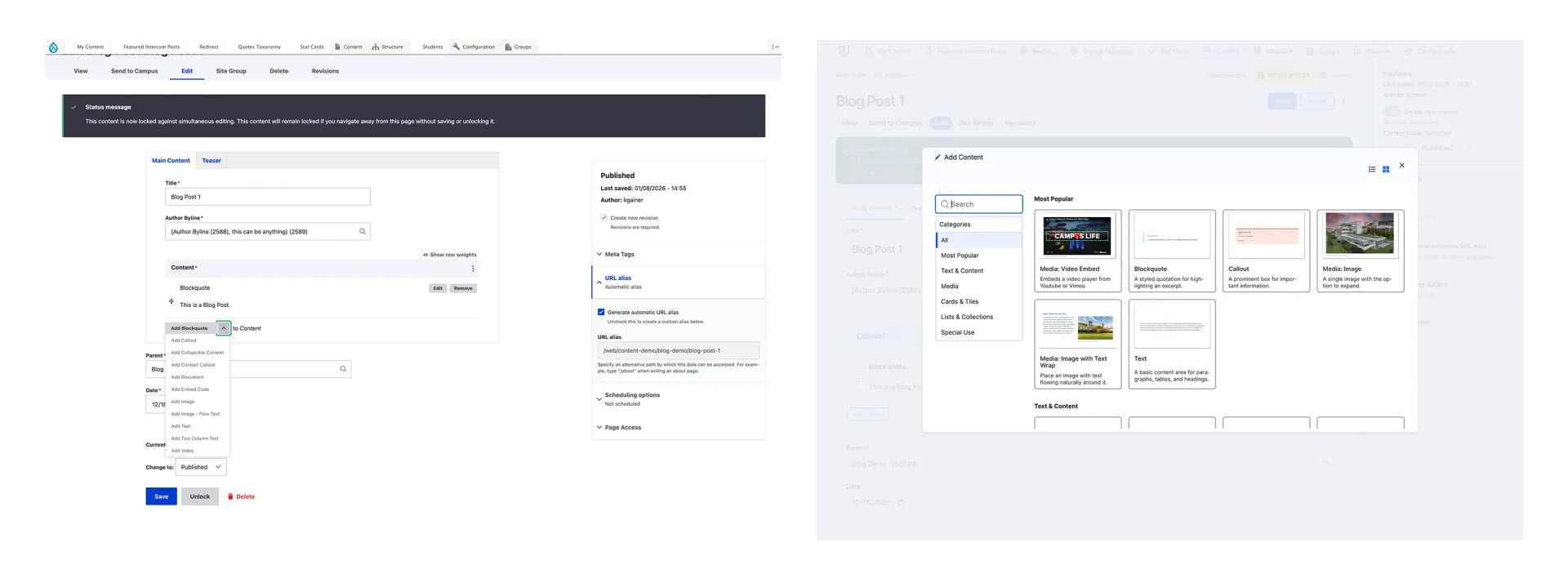
Before: A plain, alphabetical dropdown with 40+ confusing options. "Info Cards" "Stat Cards" "Card Featured" "Card Collection" No descriptions. No previews. No categories.
After: A full-screen gallery modal. Every component is now in a card, image preview, simple description, categories filter, and search. The dropdown is gone. The guesswork is gone.
After: A full-screen gallery modal. Every component is now in a card, image preview, simple description, categories filter, and search. The dropdown is gone. The guesswork is gone.
Root causes:
- Renamed 15+ components for clarity
- Merged or removed duplicate components
- Written 40+ descriptions
Launch & Results
Pre-launch Communication
We sent a "no surprises" email two weeks ahead, hosted two live Zoom walkthroughs, and launched a training site with guides. The goal was to reduce anxiety by emphasizing what wasn't changing.
The Rollout
We deployed the update after business hours. No database migrations. No content freezes. If something broke, rolling back was one click.
Immediate Outcomes
Zero critical tickets day one. The support team braced for chaos, and got none.
30-day Metrics:
- Component selection error: 65% lower
- Returning weekly editors: +28%
- Abandoned edits: 52% lower
What I'd Do Differently
1. Test on older devices.
The sticky bar rendered poorly on older iPads. It worked, but looked janky. I'd catch this with one more round of device testing.
2. Add "Recently Used" to the component gallery.
Power users added the same three components 80% of the time. I made them search or browse every time.
3. Interview the people who never filed a ticket.
I only talked to people who filed tickets. I never heard from the ones who silently gave up or found workarounds.
The Takeaway
Reducing confusion matters more than adding features. In this redesign, every major gain came from subtraction: killing ambiguous dropdowns, pinning a lost Save button, and letting editors add content anywhere.
What I'll carry forward:
- Name components for what they do, not for internal logic.
- Watch users work, tickets tell you what, observation tells you why.
- The best metric isn’t always planned. Unsolicited praise from a relieved editor told me more than any KPI.
Looking back, the biggest win wasn’t the metrics, it was that editors stopped being afraid to hit “publish.”

